Showing posts with label service. Show all posts

Sunday, May 19, 2013

CANON iR2200 iR2800 iR3300 SERVICE MANUAL


This Service Manual provides you with all technical information relating to the basic configuration decided for Canon iR2200/iR2800/iR3300.

Table of contents Canon iR2200/iR2800/iR3300 Service And Repair Manual Copier

* Maintenance And Inspection
* Image Adjustment Basic Procedure
* Standars And Adjustments
* Troubleshooting Image Faults Manlfunctions
* Service Mode
* Self Diagnosis
* Upgrading
* Appendix
Manual Service Copier Download

Wednesday, May 15, 2013

SSC SERVICE UTILITY

I hope this helps some of you who are frustrated and ready to throw out your Epson printer
Problems with my Epson printer, the red and green light began flashing and a window popped up, saying, take it to your services center because some parts have reached the end of their life.
Printer companies set a “protection counter” on all printers , it’s an internal counter measuring the amount of ink wasted by head cleaning.
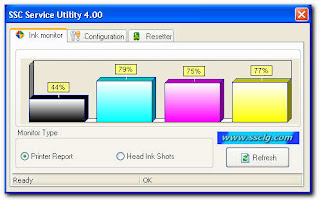

Reset the "protection counter" as well as clean the “waste ink pad overflow”.

1. Unplug the power and USB cables from the printer. Pry open the printer,
careful not to break anything. Use a flat blade screwdriver to pry it apart;
there are two-three tabs at the back and two at the front. Gently push them in,
and then using a bit of force pry apart the cover.
2. Next remove the two (2) waste ink pads.
They are located at the back on the left hand side. I used the flat blade
screwdriver to lift up the ink pads (they were soaked).
Please use rubber gloves as it gets very messy.
3. Next wash them with just plain hot water until they are white again.
I just let the hot water run on them (the pads are about three inches long).

4. Once washed dry them using a hair drier. (you could place it the sun for
a few hours or on top of your heater or maybe in a heated oven; (make sure you do
not set it on fire with too much heat).
5. Once dried place the pads back in the ink waste bin at the back of the printer.
6. Closed the printer cover and put back all the pieces and plug in the USB
& power cable and turned it on. (Yes the lights are still flashing).
7. Go to this link and download this software: SSC Download
8. Install the software and run it.
9. Select your printer and model number. It will ask if you replaced with new pads;
say “YES”. Then close the window.
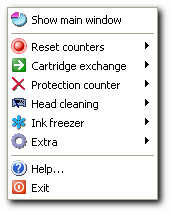
10. Now right click on the SSC service utility, it looks like
a printer icon near your clock in the task bar.
11. Then click on reset counters. You can do all other stuff with this utility too.
12. Turn off the printer power and then turn it on again.
If necessary un-plug the power cord from the back of the printer,
wait 20 seconds. Plug it back in.
13. IT WORKS AGAIN.

SSC Service Utility versions 4 10

- support for PM-970C
- support for PictureMate
- support for RX700
- support for R2400
- support for PM-A700
- support for PM-G720
- support for RX520
- support for CX7800
- support for CX4100
- support for DX3800
- support for CX3800/CX3810
- support for CX3700
- support for C67/68 and Photo Editions
- support for C87/C88/D88 and Photo Editions
- support for R220/R230
- support for R320
- support for CX4500
- support for CX3650
- various bug fixes

Tuesday, May 14, 2013

SSC Service

SSC Service for Epson Stylus Printers.Main features.

SSC Service allow you to do many amazing things with Your Epson printer :
1) Work directly with CSIC in Epson Stylus printers cartridges.
2) Reset or rewrite any chip using special addon device.
3) Freeze internal ink counters.
4) Reset internal ink counters even with empty cartridges.
5) Separate cleaning of color and black heads for all Epson inkjet printers, powerful cleaning mode.
6) Hot swapping of cartridges supported.
7) Resetting of protection counter (even then it is already full).
8) More then 100 different Epson printers supported
This allow many people with high printing demands to save some money (program works with both black and color cartridges).Up to day this software works under Windows 95/98/ME/2K2/XP with both the LPT and USB printers.
NOTE ! You can lost Epson lifetime guarantee on print head by refilling ink cartridges!Please, read all instructions in help file before doing anything with Your printer!Please, post filled test report form generated by the program (test report button) to us in case of any software problem or if Your printer is unsupported by this software (read instructions how to make test report in this case in help file)

NOTE!

1) This is freeware project, so it is illegal to take money for this software.
2) Distribution of this software from any site other then www.ssclg.com or one of our official partners sites
is prohibited!(с) 2002-2007 SSC Localization Group

Service Adjustment Program Stylus Epson

Today you can download FREE Service Programs:

Epson Stylus Color type 480,580,680,777,780,790,860,1160,61,62,70,825
830,870,890,950,1270,1280, printer service program download (336) FREE!
This is the most downloads for reseters ( according to my downloads count )Just download at this link :
stylus photo C67 Download Free
stylus photo 510 Download Free
stylus cx3900 Download Free
stylus Photo R210 Download Free
stylus Photo R310 Download Free
stylus Photo C58 Download Free
stylus C60 Download Free
stylus Photo C59 Download Free
stylus Photo C20,40 Download Free
stylus Photo C41,42,43,44,45,46 Download Free
stylus Photo C61,62 Download Free
stylus photo C63,64 Download Free
stylus photo 83,84,85 Download Free
stylus photo C67,68 Download Free
stylus photo C65 Download Free
stylus Color 580 Download Free
stylus Color 680,777 Download Free
stylus photo C80,70 Download Free
stylus Color 780,790 Download Free
stylus Color 925 Download Free
stylus Color 1520,3000Download Free
stylus Collor 880 Download Free

Monday, May 13, 2013

SSC Service Utility versions 4 30

- support for R270
- support for R240
- support for R340
- support for CX2800
- support for CX3900
- support for CX4900
- support for CX5900
- support for C58/C59
- support for RX640
- improved support for C2100/2200
- improved support for RX700
- improved support for R2400
- improved support for 785EPX/825/895/915
- some other improvements and bug fixes

Saturday, May 11, 2013

SSC Service Utility versions 4 00

- ability to work with additional reset device
- support for CX4600
- support for CX5300
- support for CX5100
- support for RX420
- support for RX425
- support for RX620
- support for R1800
- improved support for almost all other printers
- improved ink freezer
- improved ink monitor, implemented status information
- protection counter reset improvements
- various bug fixes

Supported printer list:

  • Epson Stylus Color 400
  • Epson Stylus Color 440,
  • Epson Stylus Color 480 LPT,
  • Epson Stylus Color 480SXU / 580,
  • Epson Stylus Color 600,
  • Epson Stylus Color 640
  • Epson Stylus Color 660
  • Epson Stylus Color 670
  • Epson Stylus Color 680 / 777
  • Epson Stylus Color 740
  • Epson Stylus Color 760
  • Epson Stylus Color 800 / 850
  • Epson Stylus Color 860
  • Epson Stylus Color 880
  • Epson Stylus Color 900 / EM-900C
  • Epson Stylus Color 980
  • Epson Stylus Color 1160
  • Epson Stylus Color 1520
  • Epson Stylus Color 3000
  • Epson Stylus C20 / C40 / CL-750
  • Epson Stylus C41 / C42 / C43 / C44 / C45 / C46 / C47 / C48
  • Epson Stylus C50
  • Epson Stylus C60
  • Epson Stylus C61 / C62
  • Epson Stylus C63 / C64
  • Epson Stylus C65 / C66 and PE
  • Epson Stylus C67 / C68 / D68 and PE
  • Epson Stylus C70
  • Epson Stylus C80
  • Epson Stylus C82
  • Epson Stylus C83 / C84
  • Epson Stylus C85 / C86 and PE
  • Epson Stylus C87 / C88 / D88 and PE
  • Epson Stylus Photo RX420 / RX425 / RX430
  • Epson Stylus Photo RX500 / RX510
  • Epson Stylus Photo RX520
  • Epson Stylus Photo RX600 / RX610
  • Epson Stylus Photo RX620
  • Epson Stylus Photo RX700
  • Epson Stylus CX3100 / CX3200
  • Epson Stylus CX3500 / CX3600 / CX3650
  • Epson Stylus CX3700
  • Epson Stylus CX3800 / CX3810 / DX3800
  • Epson Stylus CX4500
  • Epson Stylus CX4600
  • Epson Stylus CX4100 / CX4200
  • Epson Stylus CX4700 / CX4800
  • Epson Stylus DX4200 / DX4800
  • Epson Stylus CX5100 / CX5200
  • Epson Stylus CX5300 / CX5400
  • Epson Stylus CX6400 / CX6600
  • Epson Stylus CX6300 / CX6500
  • Epson Stylus CX7800
  • Epson PictureMate
  • Epson Stylus Photo
  • Epson Stylus Photo EX
  • Epson Stylus Photo 700 / IP-100
  • Epson Stylus Photo 750 / PM-770C
  • Epson Stylus Photo 780 / 790 / PM-780C
  • Epson Stylus Photo 810 / 820
  • Epson Stylus Photo 820
  • Epson Stylus Photo 825 / 915
  • Epson Stylus Photo 830 / 830U
  • Epson Stylus Photo 870 / PM-875DC
  • Epson Stylus Photo R200 / R210
  • Epson Stylus Photo R220 / R230
  • Epson Stylus Photo R300 / R310
  • Epson Stylus Photo R320
  • Epson Stylus Photo R800 / PX-G900
  • Epson Stylus Photo R1800
  • Epson Stylus Photo R2400
  • Epson Stylus Photo 890
  • Epson Stylus Photo PM-890C
  • Epson Stylus Photo PM-A700
  • Epson Stylus Photo PM-G720
  • Epson Stylus Photo PM-970C
  • Epson Stylus Photo 895/ 785EPX
  • Epson Stylus Photo 900
  • Epson Stylus Photo 925 / 935
  • Epson Stylus Photo 950 / 960 / PM-950C
  • Epson Stylus Photo 1200 / PM-3000C
  • Epson Stylus Photo 1270 / PM-3300C
  • Epson Stylus Photo 1280 / PM-3500C
  • Epson Stylus Photo 1290
  • Epson Stylus Photo 2000P
  • Epson Stylus Photo 2100
  • Epson Stylus Photo 2200 / PM-4000EPX
  • Epson Stylus Pro 5000 / PM-5000C

Wednesday, May 8, 2013

SSC Service Utility versions 4 20

- support for CX4200/CX4700/CX4800/DX4200/DX4800
- support for C47/C48
- support for RX430
- support for CX6500/CX6300
- improved support for CX6400/CX6600
- improved support for RX500/RX510
- improved support for RX600/RX610
- improved support for R1800
- improved support for CX3700/CX3800/DX3800/DX3850
- improved support for C67/C68/D68
- improved support for C87/C88/D88
- many new chip models supported
- some other improvements and bug fixes